
This is preview documentation. The official release is not yet available.
Interface tour
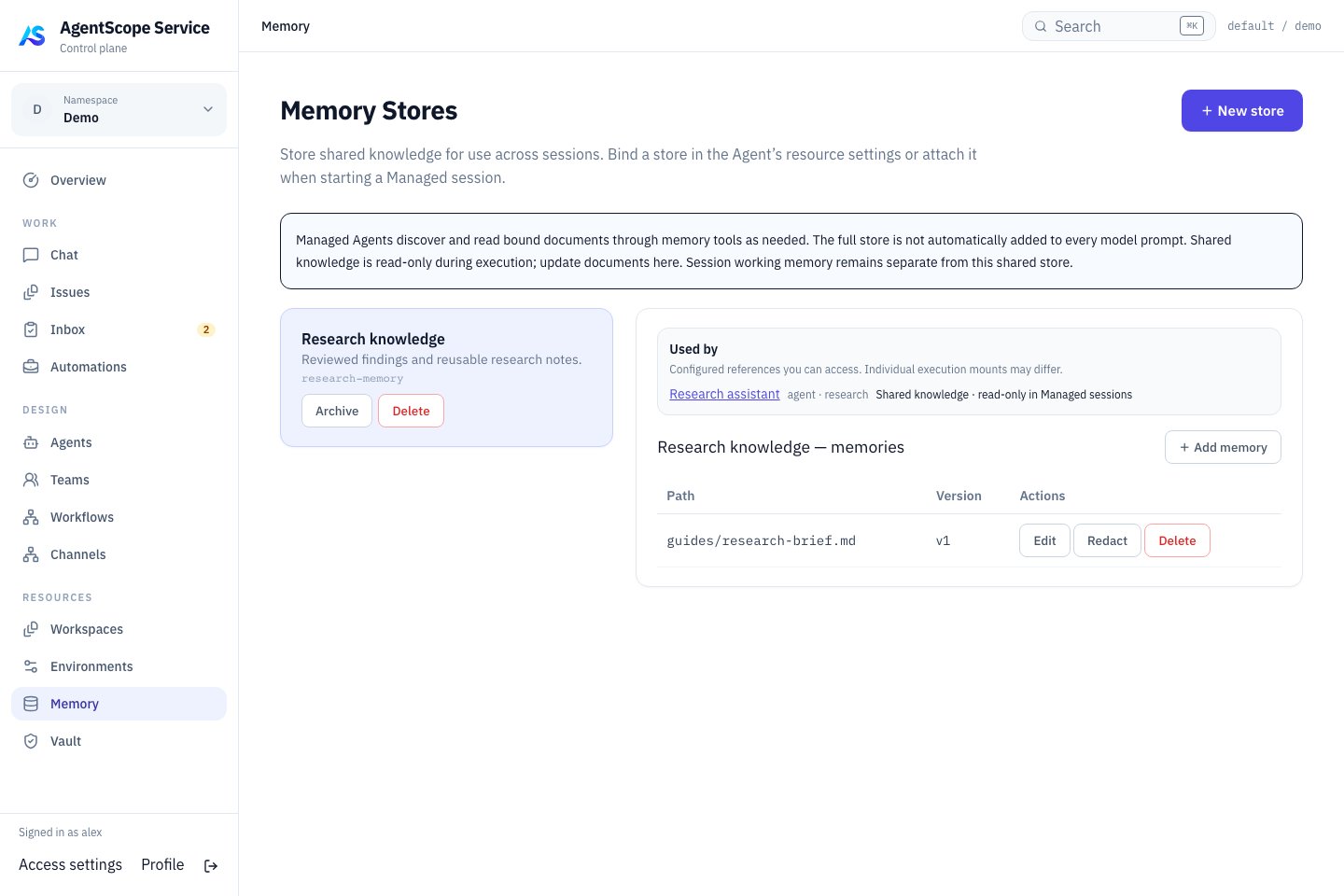
Current console UI with fixed demonstration data.
Create a store
Select New store, add a name and description, then use Add memory for a document path and content. For example,product/glossary.md can contain definitions, sources and an update date. Bind the Store to an Agent and inspect consumers in its resource detail.
In a new Chat, ask a question requiring the document and request its source. Confirm that the Agent found the intended content through memory tools.
Bind and verify
- Select the Store in the Managed Agent’s Runtime → Session defaults → Default memory stores and save. This sets
defaultMemoryStoreIds. - Add a distinctive demonstration fact to
product/glossary.md, such as “This project defines Lark as the weekly-report archival task.” Start a new Chat and ask it to list knowledge documents and explain Lark. - Inspect tool activity:
memory_store_listdiscovers mounted content andmemory_store_readreads the document. Check the answer and source path so prior model knowledge does not look like successful binding.
memoryStoreIds to override defaults. Omission inherits defaults; [] mounts no default Store for that Session. Mentioning a Store in Instructions does not create a binding.
Shared documents are read live on demand instead of copying their contents permanently into each Session. Update the test fact and request another tool read to verify the change. Earlier conversation messages retain their previous quotations. Use a new Session when changing resource bindings.