> ## Documentation Index
> Fetch the complete documentation index at: https://java.agentscope.io/llms.txt
> Use this file to discover all available pages before exploring further.
# Vault:为工具提供凭据
此为预览文档,正式版本尚未发布。
**Resources → Vault** 保存 Agent 工具连接使用的凭据。Secret 写入后页面只展示类型、标签和目标等元数据,不重新展示明文。
## 界面导览
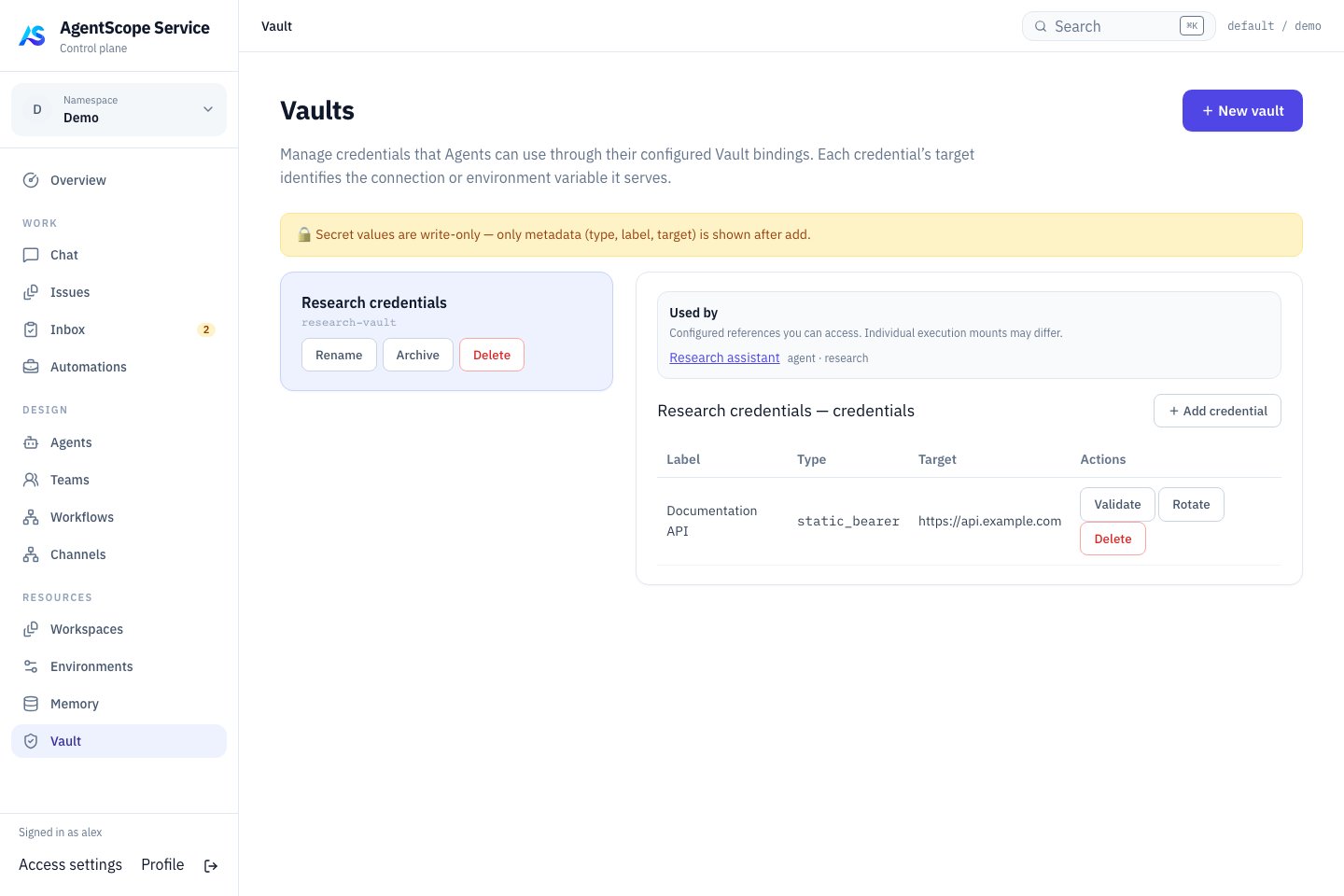 选择 Vault 后,核对凭据的名称、类型和目标地址,再将它关联到需要访问该服务的 Agent。图中仅展示演示凭据的元数据,不包含真实密钥。
## 配置一个连接
创建 Vault,点击 **Add credential**,选择类型并填写 Label、Target 和 Secret。将 Vault 绑定到使用该连接的 Agent,再配置相应 MCP 工具。先执行一次只读调用确认认证正常。
| 类型 | 使用方式 |
| - | - |
| Bearer / MCP OAuth | Target 匹配连接名或完整 endpoint URL,包含路径 |
| Environment variable | 只替换 MCP header、环境或 query 中明确引用的 `${VARIABLE}` |
| Generic secret | 只提供存储,不会自动注入任意工具 |
OAuth 内容需要 `access_token`,可按连接需要包含刷新信息。保存凭据本身不意味着外部服务已授予正确权限。
## 为 Managed Agent 绑定凭据
在 Agent 的 **Runtime → Session defaults → Default vaults** 选择 Vault 并保存,对应 `defaultVaultIds`。随后在 Definition 的工具/MCP 设置中配置连接。Session API 的 `vaultIds` 可覆盖默认列表:省略继承默认绑定,`[]` 不挂载默认 Vault。
凭据类型对应 API 值 `static_bearer`、`mcp_oauth`、`environment_variable` 和 `api_key`。其中 `api_key` 是通用存储类型,不会自动配置模型认证或注入工具。环境变量类型也不会全局导出到 Dataplane 或任意 Shell 进程。
例如创建 `environment_variable` 凭据,Target 填 `REPORTS_TOKEN`,Secret 填外部服务签发的值。在 MCP 连接中显式引用;下面是连接字段片段,URL 需要替换成你的服务地址:
```json theme={null}
{
"name": "reports",
"url": "https://reports.example.com/mcp",
"headers": {
"Authorization": "Bearer ${REPORTS_TOKEN}"
}
}
```
将这些字段放入该 Agent 的 `mcpServers` 连接,并选择匹配的 HTTP transport。新建 Chat 后调用一次只读工具。若使用 `static_bearer`,则将 Target 设为连接名 `reports` 或完整 endpoint,由解析器设置 Bearer header,无需再配置同名占位符。一个连接只选一种清晰的认证方式,避免多个凭据竞争同一目标。
## 验证和轮换
Validate 检查凭据,Rotate 写入替代 secret。轮换前确认外部系统中的新凭据有效,随后验证实际工具调用。删除前查看消费者,避免同时中断多个 Agent。
不把 secret 写进 Instructions、AGENTS.md、聊天或公开示例。Vault 加密数据依赖部署的 master key;管理员备份必须同时保存数据库和原密钥,单独恢复数据库不足以恢复连接。
失败时检查 Target 是否完整匹配、变量是否明确引用、Vault 是否绑定以及外部权限是否有效。不要通过在聊天里直接粘贴 secret 来排障。
下一步:[工具配置](/v2/zh/service/agents) · [备份恢复](/v2/zh/service/operations)。
This documentation is built and hosted on [Mintlify](https://mintlify.com), a developer documentation platform.
选择 Vault 后,核对凭据的名称、类型和目标地址,再将它关联到需要访问该服务的 Agent。图中仅展示演示凭据的元数据,不包含真实密钥。
## 配置一个连接
创建 Vault,点击 **Add credential**,选择类型并填写 Label、Target 和 Secret。将 Vault 绑定到使用该连接的 Agent,再配置相应 MCP 工具。先执行一次只读调用确认认证正常。
| 类型 | 使用方式 |
| - | - |
| Bearer / MCP OAuth | Target 匹配连接名或完整 endpoint URL,包含路径 |
| Environment variable | 只替换 MCP header、环境或 query 中明确引用的 `${VARIABLE}` |
| Generic secret | 只提供存储,不会自动注入任意工具 |
OAuth 内容需要 `access_token`,可按连接需要包含刷新信息。保存凭据本身不意味着外部服务已授予正确权限。
## 为 Managed Agent 绑定凭据
在 Agent 的 **Runtime → Session defaults → Default vaults** 选择 Vault 并保存,对应 `defaultVaultIds`。随后在 Definition 的工具/MCP 设置中配置连接。Session API 的 `vaultIds` 可覆盖默认列表:省略继承默认绑定,`[]` 不挂载默认 Vault。
凭据类型对应 API 值 `static_bearer`、`mcp_oauth`、`environment_variable` 和 `api_key`。其中 `api_key` 是通用存储类型,不会自动配置模型认证或注入工具。环境变量类型也不会全局导出到 Dataplane 或任意 Shell 进程。
例如创建 `environment_variable` 凭据,Target 填 `REPORTS_TOKEN`,Secret 填外部服务签发的值。在 MCP 连接中显式引用;下面是连接字段片段,URL 需要替换成你的服务地址:
```json theme={null}
{
"name": "reports",
"url": "https://reports.example.com/mcp",
"headers": {
"Authorization": "Bearer ${REPORTS_TOKEN}"
}
}
```
将这些字段放入该 Agent 的 `mcpServers` 连接,并选择匹配的 HTTP transport。新建 Chat 后调用一次只读工具。若使用 `static_bearer`,则将 Target 设为连接名 `reports` 或完整 endpoint,由解析器设置 Bearer header,无需再配置同名占位符。一个连接只选一种清晰的认证方式,避免多个凭据竞争同一目标。
## 验证和轮换
Validate 检查凭据,Rotate 写入替代 secret。轮换前确认外部系统中的新凭据有效,随后验证实际工具调用。删除前查看消费者,避免同时中断多个 Agent。
不把 secret 写进 Instructions、AGENTS.md、聊天或公开示例。Vault 加密数据依赖部署的 master key;管理员备份必须同时保存数据库和原密钥,单独恢复数据库不足以恢复连接。
失败时检查 Target 是否完整匹配、变量是否明确引用、Vault 是否绑定以及外部权限是否有效。不要通过在聊天里直接粘贴 secret 来排障。
下一步:[工具配置](/v2/zh/service/agents) · [备份恢复](/v2/zh/service/operations)。
This documentation is built and hosted on [Mintlify](https://mintlify.com), a developer documentation platform.