> ## Documentation Index
> Fetch the complete documentation index at: https://java.agentscope.io/llms.txt
> Use this file to discover all available pages before exploring further.
# Vault: credentials for tools
This is preview documentation. The official release is not yet available.
**Resources → Vault** stores credentials for Agent tool connections. Secrets are write-only in the UI; after saving, it shows metadata such as type, label and target.
## Interface tour
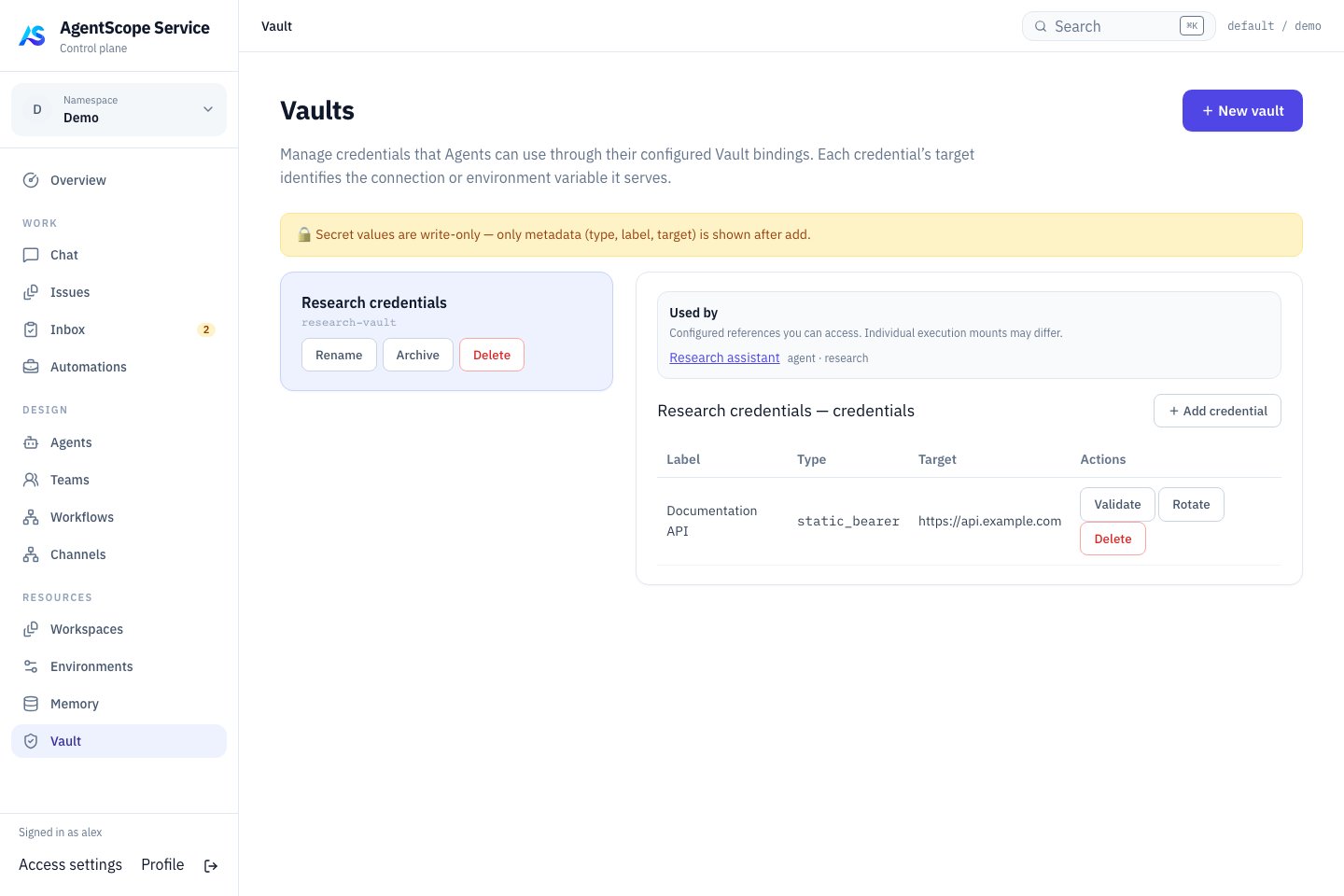 Select a vault and check each credential’s label, type and target before linking it to the Agent that needs access. The screenshot contains only synthetic credential metadata, with no real secret.
## Configure a connection
Create a Vault and select **Add credential**. Choose the type and enter Label, Target and Secret. Bind the Vault to the Agent and configure its MCP tool. Verify authentication with a read-only call.
| Type | Application |
| - | - |
| Bearer / MCP OAuth | Target matches a connection name or complete endpoint URL, including its path |
| Environment variable | Substitutes explicitly referenced `${VARIABLE}` values in MCP headers, environment or query parameters |
| Generic secret | Storage only; does not automatically inject into arbitrary tools |
OAuth content requires `access_token` and can include refresh information as needed. Saving a credential does not grant external permissions.
## Bind credentials to a Managed Agent
Select a Vault in **Runtime → Session defaults → Default vaults** and save, setting `defaultVaultIds`. Then configure the connection in Definition's tool/MCP settings. Session API `vaultIds` can override the defaults: omission inherits bindings, while `[]` mounts no default Vault.
The API type values are `static_bearer`, `mcp_oauth`, `environment_variable` and `api_key`. The `api_key` type is generic storage; it does not automatically configure model authentication or inject into tools. Environment-variable credentials are not globally exported to the Dataplane or arbitrary Shell processes either.
For example, create an `environment_variable` credential with Target `REPORTS_TOKEN` and the external service's token as Secret. Reference it explicitly in the MCP connection. This connection fragment uses a placeholder URL; replace it with your service endpoint:
```json theme={null}
{
"name": "reports",
"url": "https://reports.example.com/mcp",
"headers": {
"Authorization": "Bearer ${REPORTS_TOKEN}"
}
}
```
Add the fields to a connection in the Agent's `mcpServers` and select the matching HTTP transport. Start a new Chat and call a read-only tool. With `static_bearer`, instead set Target to `reports` or the full endpoint; the resolver supplies the Bearer header without this placeholder. Use one clear authentication method per connection to avoid competing credentials for the same target.
## Validate and rotate
Use Validate to check a credential and Rotate to replace its secret. Confirm the new credential with the external system, then verify a real tool call. Inspect consumers before deletion to avoid interrupting several Agents.
Keep secrets out of Instructions, AGENTS.md, conversations and public examples. Encrypted Vault data depends on the deployment master key; recovery requires both the database and the original key.
For failures, check the exact Target, explicit variable references, Vault binding and external permissions. Do not paste secrets into Chat for diagnosis.
Next: [Agent tools](/v2/en/service/agents) · [Backup and recovery](/v2/en/service/operations).
This documentation is built and hosted on [Mintlify](https://mintlify.com), a developer documentation platform.
Select a vault and check each credential’s label, type and target before linking it to the Agent that needs access. The screenshot contains only synthetic credential metadata, with no real secret.
## Configure a connection
Create a Vault and select **Add credential**. Choose the type and enter Label, Target and Secret. Bind the Vault to the Agent and configure its MCP tool. Verify authentication with a read-only call.
| Type | Application |
| - | - |
| Bearer / MCP OAuth | Target matches a connection name or complete endpoint URL, including its path |
| Environment variable | Substitutes explicitly referenced `${VARIABLE}` values in MCP headers, environment or query parameters |
| Generic secret | Storage only; does not automatically inject into arbitrary tools |
OAuth content requires `access_token` and can include refresh information as needed. Saving a credential does not grant external permissions.
## Bind credentials to a Managed Agent
Select a Vault in **Runtime → Session defaults → Default vaults** and save, setting `defaultVaultIds`. Then configure the connection in Definition's tool/MCP settings. Session API `vaultIds` can override the defaults: omission inherits bindings, while `[]` mounts no default Vault.
The API type values are `static_bearer`, `mcp_oauth`, `environment_variable` and `api_key`. The `api_key` type is generic storage; it does not automatically configure model authentication or inject into tools. Environment-variable credentials are not globally exported to the Dataplane or arbitrary Shell processes either.
For example, create an `environment_variable` credential with Target `REPORTS_TOKEN` and the external service's token as Secret. Reference it explicitly in the MCP connection. This connection fragment uses a placeholder URL; replace it with your service endpoint:
```json theme={null}
{
"name": "reports",
"url": "https://reports.example.com/mcp",
"headers": {
"Authorization": "Bearer ${REPORTS_TOKEN}"
}
}
```
Add the fields to a connection in the Agent's `mcpServers` and select the matching HTTP transport. Start a new Chat and call a read-only tool. With `static_bearer`, instead set Target to `reports` or the full endpoint; the resolver supplies the Bearer header without this placeholder. Use one clear authentication method per connection to avoid competing credentials for the same target.
## Validate and rotate
Use Validate to check a credential and Rotate to replace its secret. Confirm the new credential with the external system, then verify a real tool call. Inspect consumers before deletion to avoid interrupting several Agents.
Keep secrets out of Instructions, AGENTS.md, conversations and public examples. Encrypted Vault data depends on the deployment master key; recovery requires both the database and the original key.
For failures, check the exact Target, explicit variable references, Vault binding and external permissions. Do not paste secrets into Chat for diagnosis.
Next: [Agent tools](/v2/en/service/agents) · [Backup and recovery](/v2/en/service/operations).
This documentation is built and hosted on [Mintlify](https://mintlify.com), a developer documentation platform.