> ## Documentation Index
> Fetch the complete documentation index at: https://java.agentscope.io/llms.txt
> Use this file to discover all available pages before exploring further.
# Team: overview and creation
This is preview documentation. The official release is not yet available.
**DESIGN → Teams** groups Agents into an assignable team. The Lead interprets the objective, chooses members and combines results. Members contribute specialist capabilities. Choose a [Workflow](/v2/en/service/workflows) for fixed ordering and branching rules.
Start with the [practical guide](/v2/en/service/create-team) for creation or connection. This reference section collects detailed configuration, supported capabilities and execution principles.
## In this chapter
* [Collaboration: delegation and delivery](/v2/en/service/team-collaboration)
* [Roles, members and policy](/v2/en/service/team-configuration)
* [Coordination and completion](/v2/en/service/team-execution)
## Interface tour
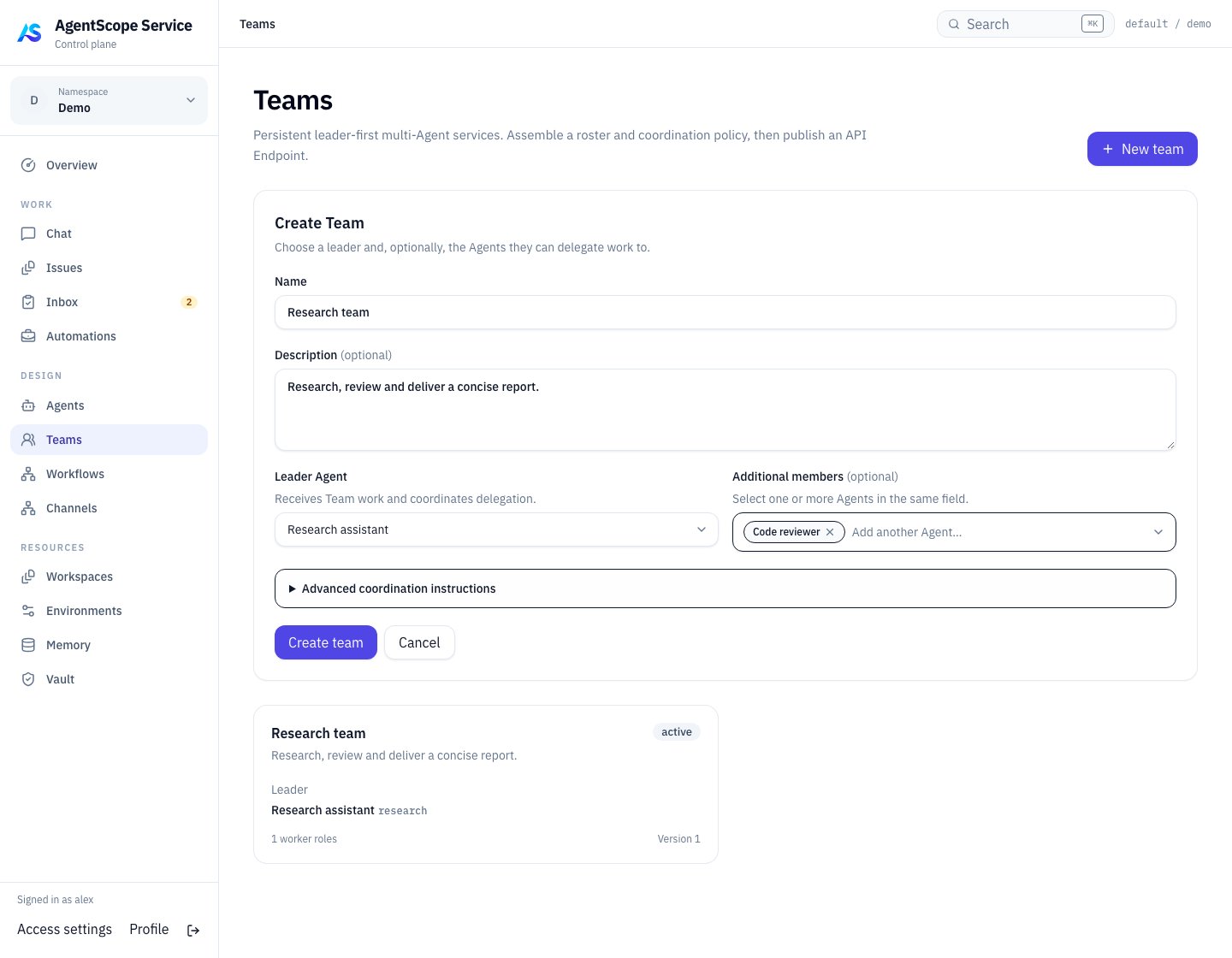 After describing the team’s purpose, select its entry point in **Leader Agent** and collaborators in **Additional members**. Expand **Advanced coordination instructions** when you need to define delegation rules.
## Create a team
First verify each member with a small individual task. For a reporting team, choose a coordinator as Lead and add Researcher and Reviewer members.
In **Roles & members**, define each role's responsibility and output: the Researcher supplies sourced facts; the Reviewer checks evidence and uncertainty. Team Instructions define shared goals, boundaries and the final deliverable. Avoid giving every member the same broad instructions.
The Lead chooses which members a request needs. Membership is an available capability set, not a promise that every member runs on every request.
## Check readiness
| State | Meaning and next action |
| - | - |
| Ready | Configuration and member capabilities pass readiness checks; verify a small task |
| Degraded | Some members or capabilities are unavailable; inspect individual reasons |
| Unavailable | Effective collaboration cannot start; check the Lead and runtime dependencies |
Members can use different execution types. Before configuring Runtime policy or member overrides, check capabilities, runtime targets and security constraints. Additional candidates do not imply seamless session migration.
## Try and expose the team
Assign a small Issue to the Team. Inspect discussion, Task map and execution results. Confirm that the Lead produces a combined deliverable and explains failures or missing information. Keep human acceptance for work needing review.
Use Teams from Issues, Automations or job Endpoints. After editing, verify a new execution; earlier executions retain their team snapshots for traceability.
Continue with [Team collaboration and extension](/v2/en/service/team-collaboration) · [Endpoints](/v2/en/service/endpoints).
This documentation is built and hosted on [Mintlify](https://mintlify.com), a developer documentation platform.
After describing the team’s purpose, select its entry point in **Leader Agent** and collaborators in **Additional members**. Expand **Advanced coordination instructions** when you need to define delegation rules.
## Create a team
First verify each member with a small individual task. For a reporting team, choose a coordinator as Lead and add Researcher and Reviewer members.
In **Roles & members**, define each role's responsibility and output: the Researcher supplies sourced facts; the Reviewer checks evidence and uncertainty. Team Instructions define shared goals, boundaries and the final deliverable. Avoid giving every member the same broad instructions.
The Lead chooses which members a request needs. Membership is an available capability set, not a promise that every member runs on every request.
## Check readiness
| State | Meaning and next action |
| - | - |
| Ready | Configuration and member capabilities pass readiness checks; verify a small task |
| Degraded | Some members or capabilities are unavailable; inspect individual reasons |
| Unavailable | Effective collaboration cannot start; check the Lead and runtime dependencies |
Members can use different execution types. Before configuring Runtime policy or member overrides, check capabilities, runtime targets and security constraints. Additional candidates do not imply seamless session migration.
## Try and expose the team
Assign a small Issue to the Team. Inspect discussion, Task map and execution results. Confirm that the Lead produces a combined deliverable and explains failures or missing information. Keep human acceptance for work needing review.
Use Teams from Issues, Automations or job Endpoints. After editing, verify a new execution; earlier executions retain their team snapshots for traceability.
Continue with [Team collaboration and extension](/v2/en/service/team-collaboration) · [Endpoints](/v2/en/service/endpoints).
This documentation is built and hosted on [Mintlify](https://mintlify.com), a developer documentation platform.