> ## Documentation Index
> Fetch the complete documentation index at: https://java.agentscope.io/llms.txt
> Use this file to discover all available pages before exploring further.
# Environments: execution locations
This is preview documentation. The official release is not yet available.
**Resources → Environments** defines where Managed Agents execute file, Shell and other tools. It is separate from a definition Workspace and from a Hosted Agent's Runtime Host.
## Interface tour
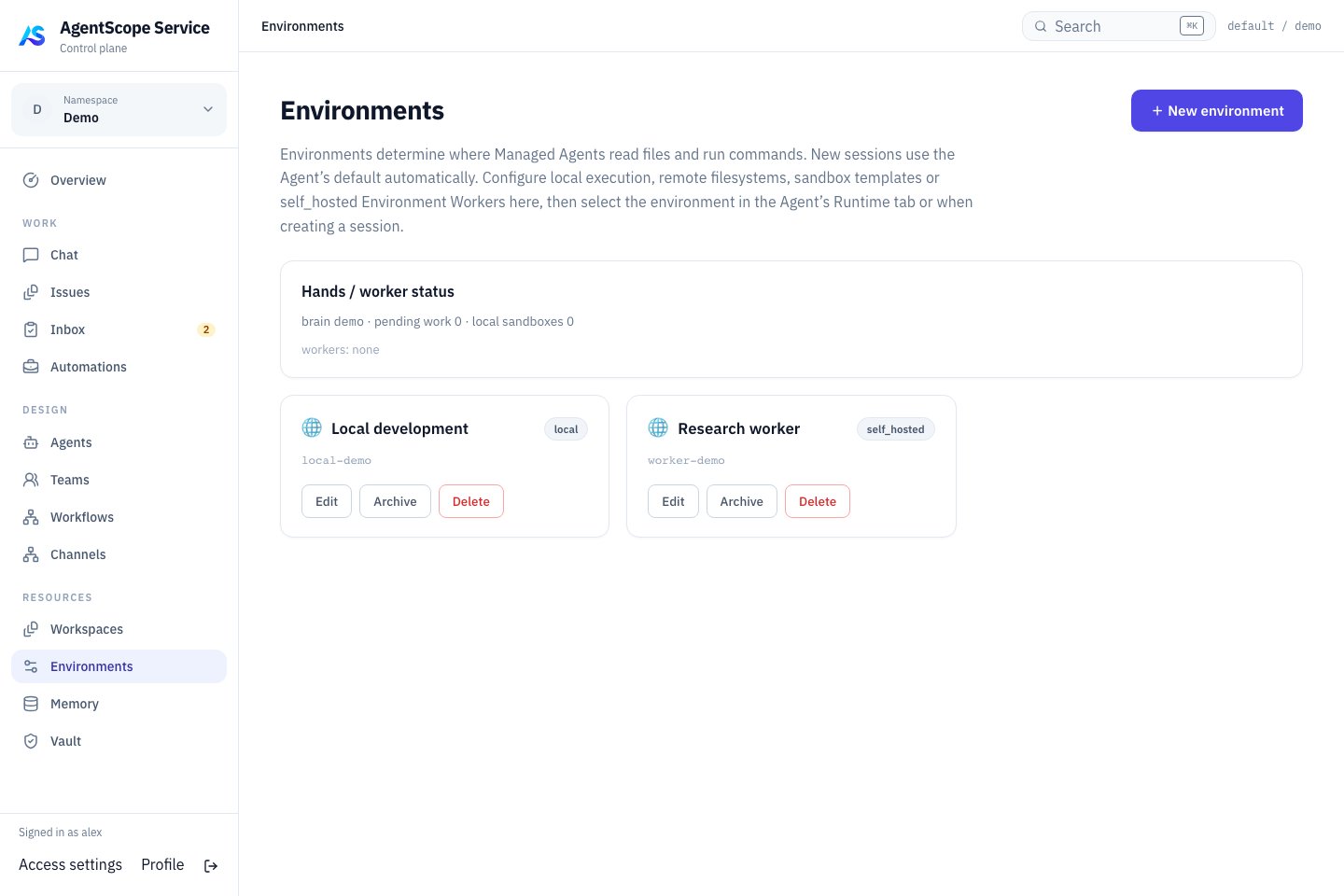 Choose an environment according to where execution should happen. **Local development** represents local execution, while **Research worker** is an example self\_hosted configuration. Creating the record still requires starting and connecting its Worker.
## Choose a type
| Type | Execution model |
| - | - |
| local | Runs with the Dataplane; requires Local to be enabled by an administrator |
| sandbox | Isolated Shell/filesystem execution through E2B |
| remote | Shared BaseStore filesystem without Shell execution |
| self\_hosted | Execution supplied by a Worker you operate |
In Docker, Local means inside the Dataplane container, not arbitrary access to the host filesystem. Choose a backend according to production isolation and networking requirements.
## Configure and verify
Create an Environment with a name and type, then edit its backend-specific JSON connection settings. Type is read-only after creation. Credentials and capabilities must match the selected backend; Runtime Host enrollment credentials are not Worker credentials.
Open a Managed Agent in **DESIGN → Agents** and select **Runtime → Session defaults → Default environment**, saved as `defaultEnvironmentId`. The creation form also exposes the choice in Advanced settings. A Session API request can use `environmentId` to select an environment for that Session.
After saving, start a new Chat and verify the connection, working directory and permissions with a read-only file operation, then check writes or commands. This binding selects tool execution; Managed model inference remains in the Dataplane even with self\_hosted execution.
## Self-hosted execution
A self-hosted Worker connects using an Environment API key. Save the key when created and supply it through the Worker's connection configuration. Check online status and a real tool call after connection. Workers execute Managed tools; Runtime Hosts run Coding Agent providers. They are not interchangeable processes.
## Diagnose tool failures
Check Environment availability, network and authentication, directory mounts, required executables and permissions. A successful model reply does not prove that file tools work. Verify configuration changes with new work and update every consumer after key rotation.
Next: [Managed Agents](/v2/en/service/managed-agent) · [Configuration](/v2/en/service/configuration).
## E2B sandbox example
An administrator supplies `BUILDER_E2B_API_KEY` through deployment configuration. Create a sandbox Environment and use this Config:
```json theme={null}
{
"templateId": "base",
"isolationScope": "SESSION",
"sandboxTimeoutSeconds": 300
}
```
Select a custom E2B template for additional executables. `workspaceRoot` controls the sandbox path; `persistenceMode` can be `TAR` or `NATIVE_SNAPSHOT`. Verify save/restore with the chosen template and backend. The remote type is filesystem-only, not a remote Shell Worker.
### Sandbox parameters
Set these fields in the Environment's Config. Omitted E2B connection settings inherit administrator deployment configuration.
| Field | Meaning and fallback |
| - | - |
| `templateId` | E2B template; `base` without a deployment override |
| `workspaceRoot` | Sandbox working path; `/home/user` without a deployment override |
| `sandboxTimeoutSeconds` | Sandbox lifetime timeout in seconds; 300 without a deployment override |
| `isolationScope` | Harness filesystem isolation scope; defaults to `SESSION` |
| `persistenceMode` | `TAR` or `NATIVE_SNAPSHOT`; defaults to TAR unless overridden in deployment |
| `apiBaseUrl` / `domain` | Custom E2B endpoint settings; usually inherited from deployment |
| `apiKey` | Per-environment E2B credential override; usually configured centrally |
Adding `packages`, Docker image or network fields to Config does not install dependencies or enforce network restrictions. Prepare programs in the E2B template and apply network policy in the actual backend. These sandbox settings do not configure local or self\_hosted containers.
## Run a self-hosted Worker from the published image
Create a self\_hosted Environment and save its API key. Set `SCHEDULER_IMAGE` to the full scheduler image reference from the manifest, `BASE_URL` to a Gateway URL reachable from the Worker, and `ENVIRONMENT_ID`/`ENVIRONMENT_KEY` to the new Environment's values.
```bash theme={null}
docker run --rm \
--name agentscope-hands \
-v agentscope-hands:/data \
--entrypoint java "$SCHEDULER_IMAGE" \
-Dloader.main=io.agentscope.builder.worker.HandsWorkerMain \
-cp /app.jar org.springframework.boot.loader.launch.PropertiesLauncher \
--base-url "$BASE_URL" \
--environment-id "$ENVIRONMENT_ID" \
--environment-key "$ENVIRONMENT_KEY" \
--hands-root /data/hands \
--worker-id hands-1
```
The Worker makes outbound Gateway requests without exposing an inbound port. Bind a Managed Agent to this Environment, request a small file read/write and observe tool suspension followed by Worker results and resumed execution. Working files persist in the named volume. Preinstall task-specific programs in your Worker image.
Use your process/container manager for restarts and distinct worker IDs for multiple Workers. Inspect claimed work before stopping; process shutdown is not business-task cancellation.
This documentation is built and hosted on [Mintlify](https://mintlify.com), a developer documentation platform.
Choose an environment according to where execution should happen. **Local development** represents local execution, while **Research worker** is an example self\_hosted configuration. Creating the record still requires starting and connecting its Worker.
## Choose a type
| Type | Execution model |
| - | - |
| local | Runs with the Dataplane; requires Local to be enabled by an administrator |
| sandbox | Isolated Shell/filesystem execution through E2B |
| remote | Shared BaseStore filesystem without Shell execution |
| self\_hosted | Execution supplied by a Worker you operate |
In Docker, Local means inside the Dataplane container, not arbitrary access to the host filesystem. Choose a backend according to production isolation and networking requirements.
## Configure and verify
Create an Environment with a name and type, then edit its backend-specific JSON connection settings. Type is read-only after creation. Credentials and capabilities must match the selected backend; Runtime Host enrollment credentials are not Worker credentials.
Open a Managed Agent in **DESIGN → Agents** and select **Runtime → Session defaults → Default environment**, saved as `defaultEnvironmentId`. The creation form also exposes the choice in Advanced settings. A Session API request can use `environmentId` to select an environment for that Session.
After saving, start a new Chat and verify the connection, working directory and permissions with a read-only file operation, then check writes or commands. This binding selects tool execution; Managed model inference remains in the Dataplane even with self\_hosted execution.
## Self-hosted execution
A self-hosted Worker connects using an Environment API key. Save the key when created and supply it through the Worker's connection configuration. Check online status and a real tool call after connection. Workers execute Managed tools; Runtime Hosts run Coding Agent providers. They are not interchangeable processes.
## Diagnose tool failures
Check Environment availability, network and authentication, directory mounts, required executables and permissions. A successful model reply does not prove that file tools work. Verify configuration changes with new work and update every consumer after key rotation.
Next: [Managed Agents](/v2/en/service/managed-agent) · [Configuration](/v2/en/service/configuration).
## E2B sandbox example
An administrator supplies `BUILDER_E2B_API_KEY` through deployment configuration. Create a sandbox Environment and use this Config:
```json theme={null}
{
"templateId": "base",
"isolationScope": "SESSION",
"sandboxTimeoutSeconds": 300
}
```
Select a custom E2B template for additional executables. `workspaceRoot` controls the sandbox path; `persistenceMode` can be `TAR` or `NATIVE_SNAPSHOT`. Verify save/restore with the chosen template and backend. The remote type is filesystem-only, not a remote Shell Worker.
### Sandbox parameters
Set these fields in the Environment's Config. Omitted E2B connection settings inherit administrator deployment configuration.
| Field | Meaning and fallback |
| - | - |
| `templateId` | E2B template; `base` without a deployment override |
| `workspaceRoot` | Sandbox working path; `/home/user` without a deployment override |
| `sandboxTimeoutSeconds` | Sandbox lifetime timeout in seconds; 300 without a deployment override |
| `isolationScope` | Harness filesystem isolation scope; defaults to `SESSION` |
| `persistenceMode` | `TAR` or `NATIVE_SNAPSHOT`; defaults to TAR unless overridden in deployment |
| `apiBaseUrl` / `domain` | Custom E2B endpoint settings; usually inherited from deployment |
| `apiKey` | Per-environment E2B credential override; usually configured centrally |
Adding `packages`, Docker image or network fields to Config does not install dependencies or enforce network restrictions. Prepare programs in the E2B template and apply network policy in the actual backend. These sandbox settings do not configure local or self\_hosted containers.
## Run a self-hosted Worker from the published image
Create a self\_hosted Environment and save its API key. Set `SCHEDULER_IMAGE` to the full scheduler image reference from the manifest, `BASE_URL` to a Gateway URL reachable from the Worker, and `ENVIRONMENT_ID`/`ENVIRONMENT_KEY` to the new Environment's values.
```bash theme={null}
docker run --rm \
--name agentscope-hands \
-v agentscope-hands:/data \
--entrypoint java "$SCHEDULER_IMAGE" \
-Dloader.main=io.agentscope.builder.worker.HandsWorkerMain \
-cp /app.jar org.springframework.boot.loader.launch.PropertiesLauncher \
--base-url "$BASE_URL" \
--environment-id "$ENVIRONMENT_ID" \
--environment-key "$ENVIRONMENT_KEY" \
--hands-root /data/hands \
--worker-id hands-1
```
The Worker makes outbound Gateway requests without exposing an inbound port. Bind a Managed Agent to this Environment, request a small file read/write and observe tool suspension followed by Worker results and resumed execution. Working files persist in the named volume. Preinstall task-specific programs in your Worker image.
Use your process/container manager for restarts and distinct worker IDs for multiple Workers. Inspect claimed work before stopping; process shutdown is not business-task cancellation.
This documentation is built and hosted on [Mintlify](https://mintlify.com), a developer documentation platform.