> ## Documentation Index
> Fetch the complete documentation index at: https://java.agentscope.io/llms.txt
> Use this file to discover all available pages before exploring further.
# Automated tasks: schedules and webhooks
This is preview documentation. The official release is not yet available.
An Automation saves when to trigger work and what an Agent or Team should do. Use it for digests, recurring checks and external events. Use a [Workflow](/v2/en/service/workflows) when you need a fixed multi-step topology.
## Interface tour
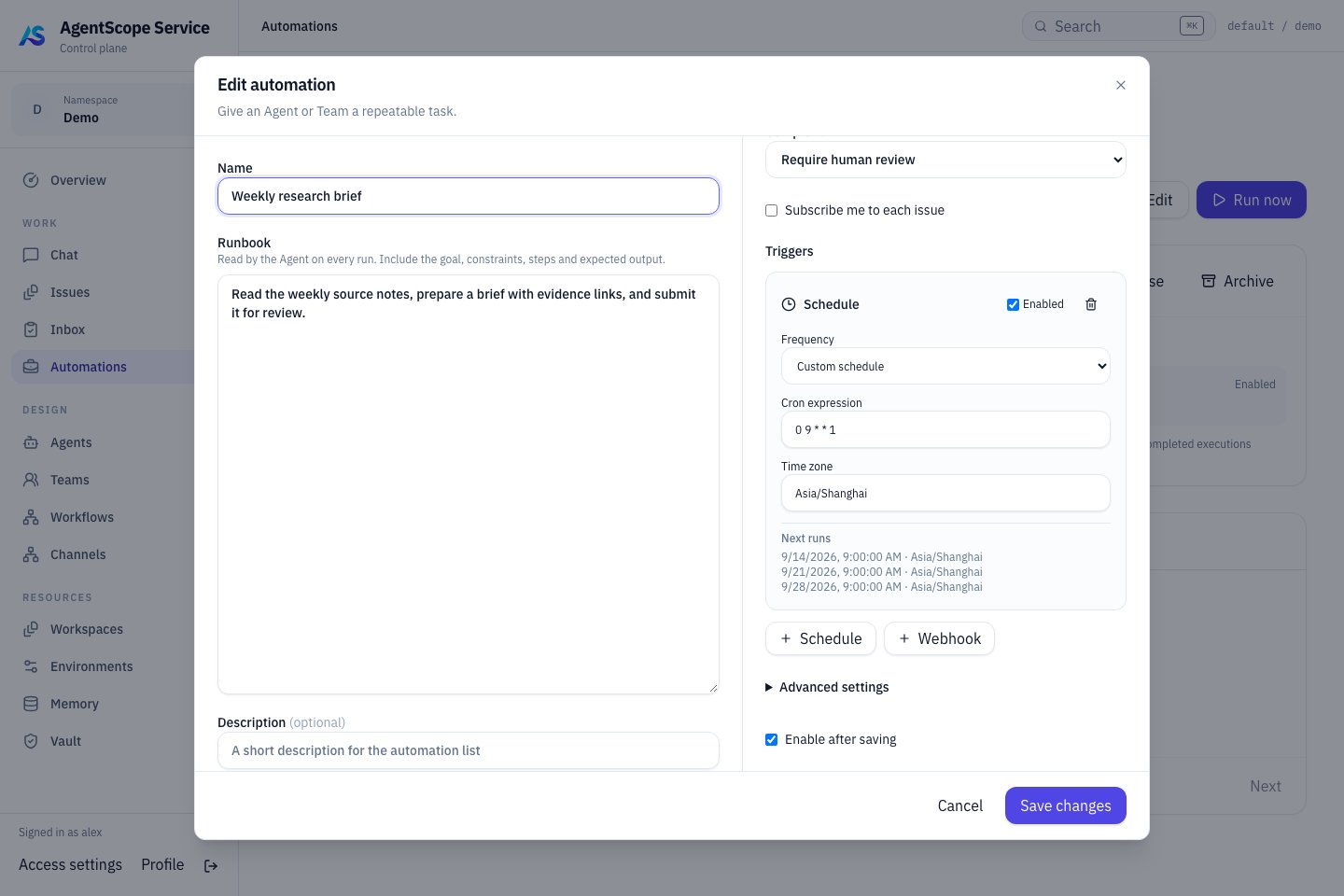
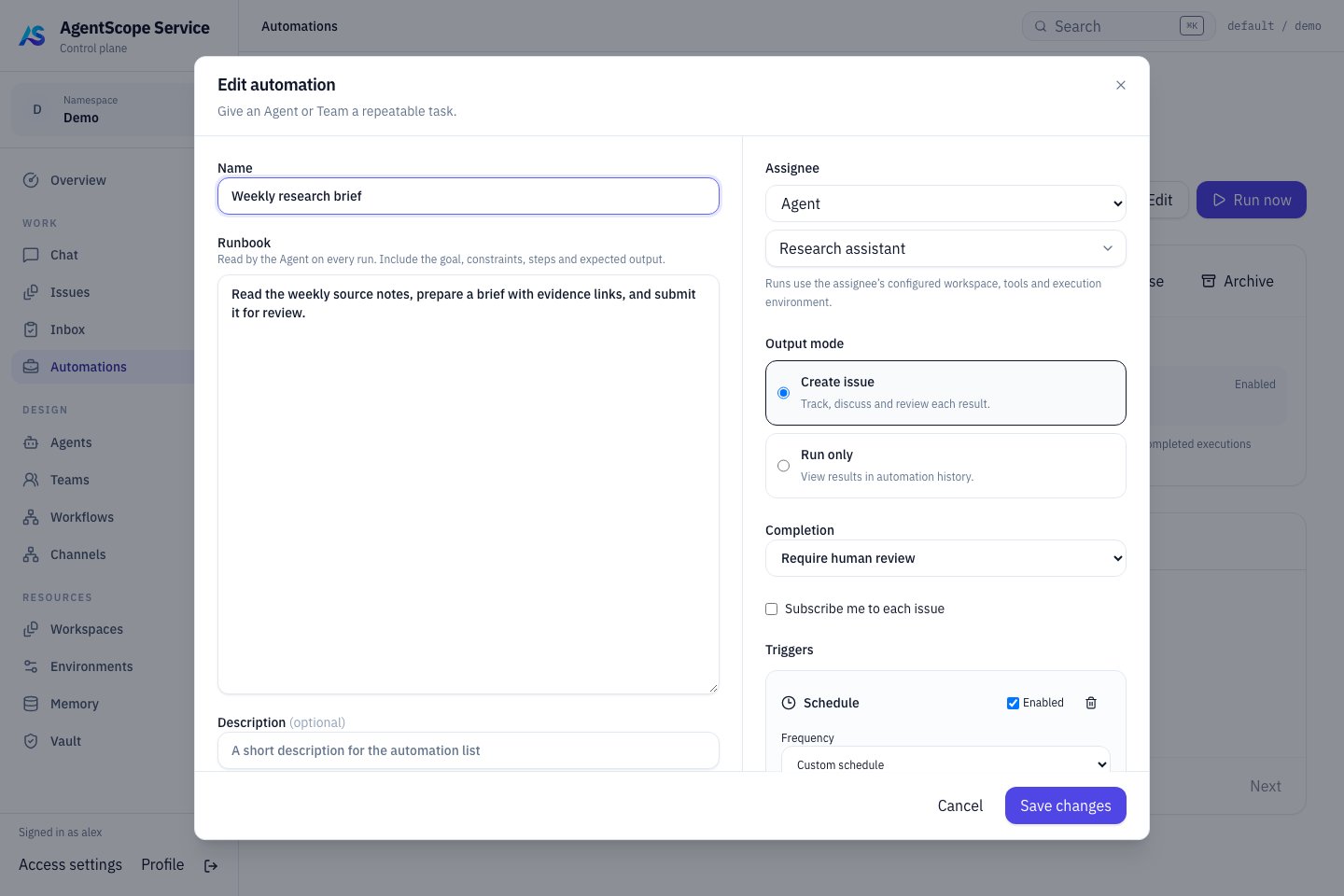 In the editor, confirm the **Runbook** and assigned Agent before choosing the output mode, completion policy and trigger schedule. Check the time zone before saving, then use **Run now** on the detail page to verify the first execution.
### Check the trigger schedule
In the editor, confirm the **Runbook** and assigned Agent before choosing the output mode, completion policy and trigger schedule. Check the time zone before saving, then use **Run now** on the detail page to verify the first execution.
### Check the trigger schedule
 ## Create a daily digest
Create a rule under **WORK → Automations**:
| Field | Example and purpose |
| - | - |
| Name | Daily engineering digest |
| Runbook | Summarize project progress, cite sources and identify unconfirmed items |
| Context | One project or document URL per line; the Agent needs actual access to read it |
| Assignee | A runnable Agent or Team |
| Output | Create issue for collaborative work; Run only for an automation execution record |
| Completion policy | Require human review for deliverables needing acceptance; automatic for suitable work |
| Schedule | `0 9 * * 1-5` for weekdays at 09:00 |
| Time zone | `Asia/Shanghai`, or your explicit intended zone |
Check the upcoming times in the schedule preview. Keep the rule disabled initially, use **Test run**, inspect the result and artifacts, then enable it. A Test run performs real work and can invoke models and tools.
## Handle overlap
**Skip** skips a new trigger while work is already active. **Queue** processes triggers in order when each event matters. Set Queue timeout to discard stale waiting work and Run timeout to bound execution duration. These apply to different phases.
Inspect status, waitReason, input, output, errors and linked Issues in Runs. Disabling a rule stops future automatic triggers; use a particular Run's Cancel action to stop existing work.
## Receive a Webhook
Add a Webhook trigger and copy its URL from the detail view. Store the secret shown on creation or rotation. Send a JSON object or array with `X-Automation-Secret` and a stable `Idempotency-Key`:
```bash theme={null}
curl --fail-with-body "$AUTOMATION_WEBHOOK_URL" \
-H 'Content-Type: application/json' \
-H "X-Automation-Secret: $AUTOMATION_SECRET" \
-H 'Idempotency-Key: build-2026-09-10-001' \
-H 'X-Event-Type: build.completed' \
--data '{"project":"example","result":"passed"}'
```
Set the environment variables to the values from your rule. Retransmit the same event with the same key and content; use a new key for a new event. Event filters accept names such as `build.completed`; empty filters accept all events. A JSON `event` field can specify the event type.
Update senders after secret rotation. A third-party webhook may need an adapter you operate if it cannot send the required authentication header.
Enable the rule and its trigger before testing webhook dispatch. Manual Test run can exercise a disabled rule; these paths have different activation requirements. The event payload is appended to task instructions as `Trigger data`. Define which fields count as evidence and when missing information must be reported. URLs in the payload do not automatically grant the Agent reading capabilities.
For CI-driven work, see the event-bridge extension in the [all-Hosted case](/v2/en/service/cases/sdlc-team). Correlate repository, PR, commit, and original work explicitly; receipt alone does not resume the old Team.
## Diagnose and retry
Deliveries show whether an event arrived or was filtered. Runs show whether work executed and what it produced. Receipt is not completion. Check the rule, trigger, filters and runtime before choosing Replay delivery or Rerun; these can repeat business side effects.
Next: [Issues](/v2/en/service/issues) · [Team collaboration](/v2/en/service/team-collaboration).
This documentation is built and hosted on [Mintlify](https://mintlify.com), a developer documentation platform.
## Create a daily digest
Create a rule under **WORK → Automations**:
| Field | Example and purpose |
| - | - |
| Name | Daily engineering digest |
| Runbook | Summarize project progress, cite sources and identify unconfirmed items |
| Context | One project or document URL per line; the Agent needs actual access to read it |
| Assignee | A runnable Agent or Team |
| Output | Create issue for collaborative work; Run only for an automation execution record |
| Completion policy | Require human review for deliverables needing acceptance; automatic for suitable work |
| Schedule | `0 9 * * 1-5` for weekdays at 09:00 |
| Time zone | `Asia/Shanghai`, or your explicit intended zone |
Check the upcoming times in the schedule preview. Keep the rule disabled initially, use **Test run**, inspect the result and artifacts, then enable it. A Test run performs real work and can invoke models and tools.
## Handle overlap
**Skip** skips a new trigger while work is already active. **Queue** processes triggers in order when each event matters. Set Queue timeout to discard stale waiting work and Run timeout to bound execution duration. These apply to different phases.
Inspect status, waitReason, input, output, errors and linked Issues in Runs. Disabling a rule stops future automatic triggers; use a particular Run's Cancel action to stop existing work.
## Receive a Webhook
Add a Webhook trigger and copy its URL from the detail view. Store the secret shown on creation or rotation. Send a JSON object or array with `X-Automation-Secret` and a stable `Idempotency-Key`:
```bash theme={null}
curl --fail-with-body "$AUTOMATION_WEBHOOK_URL" \
-H 'Content-Type: application/json' \
-H "X-Automation-Secret: $AUTOMATION_SECRET" \
-H 'Idempotency-Key: build-2026-09-10-001' \
-H 'X-Event-Type: build.completed' \
--data '{"project":"example","result":"passed"}'
```
Set the environment variables to the values from your rule. Retransmit the same event with the same key and content; use a new key for a new event. Event filters accept names such as `build.completed`; empty filters accept all events. A JSON `event` field can specify the event type.
Update senders after secret rotation. A third-party webhook may need an adapter you operate if it cannot send the required authentication header.
Enable the rule and its trigger before testing webhook dispatch. Manual Test run can exercise a disabled rule; these paths have different activation requirements. The event payload is appended to task instructions as `Trigger data`. Define which fields count as evidence and when missing information must be reported. URLs in the payload do not automatically grant the Agent reading capabilities.
For CI-driven work, see the event-bridge extension in the [all-Hosted case](/v2/en/service/cases/sdlc-team). Correlate repository, PR, commit, and original work explicitly; receipt alone does not resume the old Team.
## Diagnose and retry
Deliveries show whether an event arrived or was filtered. Runs show whether work executed and what it produced. Receipt is not completion. Check the rule, trigger, filters and runtime before choosing Replay delivery or Rerun; these can repeat business side effects.
Next: [Issues](/v2/en/service/issues) · [Team collaboration](/v2/en/service/team-collaboration).
This documentation is built and hosted on [Mintlify](https://mintlify.com), a developer documentation platform.