> ## Documentation Index
> Fetch the complete documentation index at: https://java.agentscope.io/llms.txt
> Use this file to discover all available pages before exploring further.
# Register or create an Agent
This is preview documentation. The official release is not yet available.
**DESIGN → Agents** manages identity, behavior and execution. Reuse an Agent in Chat, Issues, Teams and Endpoints. Saving its definition does not start work.
## Choose an integration path
* **Managed Agent**: create a cloud Agent in the console, then configure its model and resources.
* **AgentScope framework**: register your own deployed application as an External Agent; task execution requires the corresponding adapter support.
* **Hosted**: connect Runtime Host and select an installed, authenticated Coding Agent provider.
The three submenus cover creation, registration and verification. Detailed parameters, resource configuration and execution principles are collected in Reference. After connecting an Agent, [submit work through an Endpoint](/v2/en/service/endpoints) or [create an Issue in the console](/v2/en/service/issues).
## Interface tour
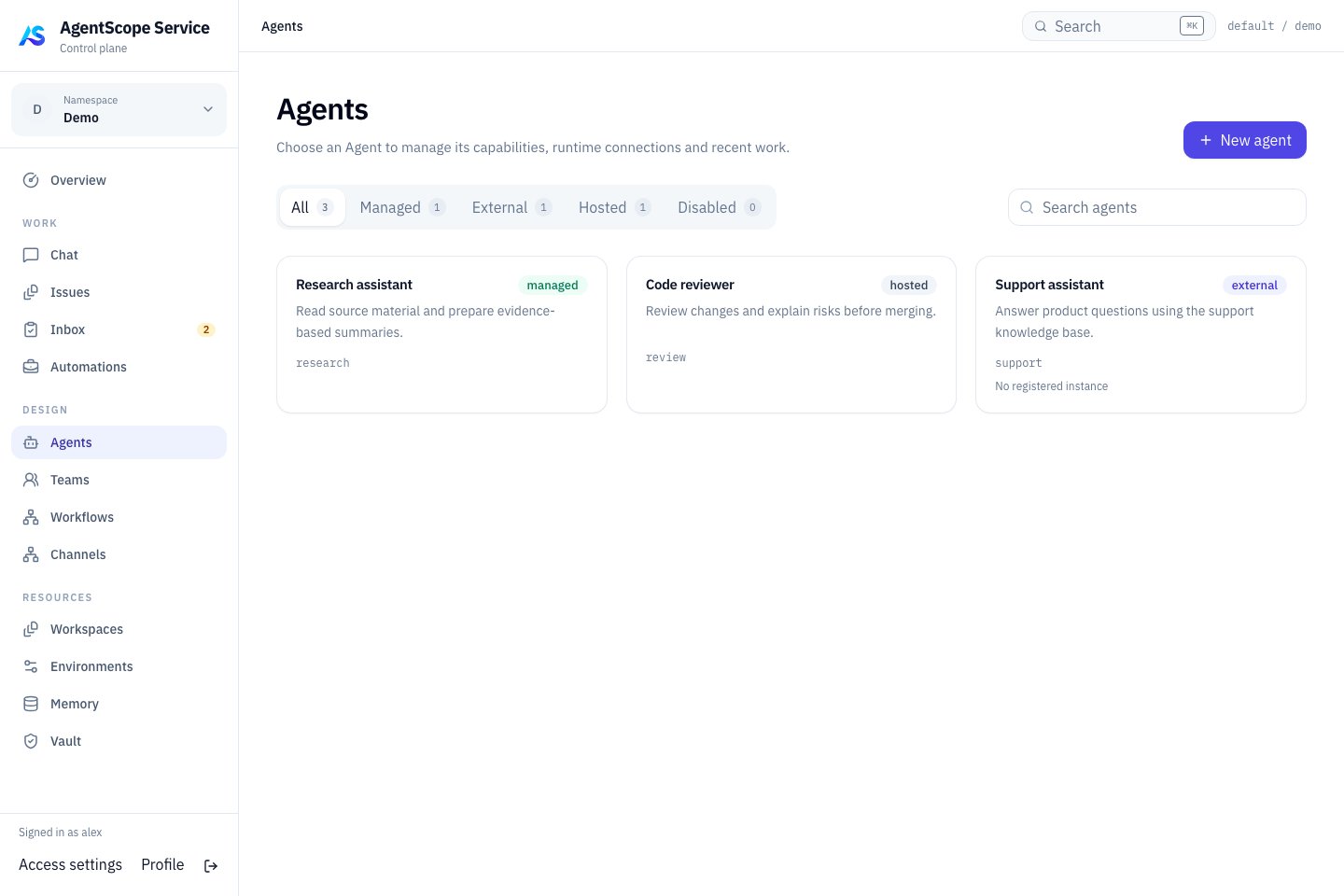 Use the filters to distinguish runtime types and the cards to identify each Agent’s purpose. Open a card to configure it, or choose **New agent** to add one. The example shows all three types; verify runtime availability for each Agent before using it.
## Choose an execution type
| Type | Where it runs | Onboarding |
| - | - | - |
| Managed | Service Harness and Dataplane | Create an Agent using AgentScope Managed |
| Hosted | A Coding Agent provider on your machine or server | Connect a Runtime Host, then select a discovered Runtime |
| External | Your independently deployed application | Register through the SDK to enter the Agent catalog |
The work entry points are shared, but models, tools, recovery and configuration projection differ. Catalog visibility does not guarantee every conversation or dispatch capability. See the dedicated [Managed](/v2/en/service/managed-agent), [Hosted](/v2/en/service/hosted-agent) and [External](/v2/en/service/external-agent) guides.
## Create an Agent
1. Start creation and enter its name, purpose and Instructions.
2. Link a Workspace when it should reuse operating guidance, skills, tools or subagent definitions.
3. Explicitly choose Runtime under Execution. An online Hosted provider may be selected initially; choose **AgentScope Managed** for a Managed Agent.
4. Leave Model empty for the runtime default, or enter a model identifier supported by that provider.
5. For Managed Agents, choose an Environment in Advanced settings. The automatic local default requires administrator permission for Local execution.
6. Select **Create & open agent**, then review the resulting configuration.
Agent key is a stable identity within the scope. The display name communicates purpose to colleagues.
## Configure the detail pages
| Page | Purpose | First verification |
| - | - | - |
| Behavior | Responsibilities, instructions and model | Ask a bounded question |
| Workspace | Materials and execution resources | Read a known file |
| Skills | Reusable procedures and supporting files | Run a task matching a skill |
| Tools | Tools and MCP connections | Make a read-only call and check authentication |
| Subagents | Delegated specialist capabilities | Inspect a delegated result |
| Versions | Definition history | Use new work to verify the intended version |
| Connections → Channels | Messaging bindings | Send a request through the actual channel |
## Add capabilities incrementally
Verify conversation first, then file access, an external tool and a specialist skill. Store credentials in [Vault](/v2/en/service/vault) and shared knowledge in [Memory](/v2/en/service/memory). Configuration does not automatically install executable tools or grant external permissions.
A shared Workspace can affect multiple Agents. Check its consumers before editing and verify with a new Chat or Issue. Do not assume that running work switches definitions immediately.
Next: [Teams](/v2/en/service/teams) · [Workspaces](/v2/en/service/workspaces).
This documentation is built and hosted on [Mintlify](https://mintlify.com), a developer documentation platform.
Use the filters to distinguish runtime types and the cards to identify each Agent’s purpose. Open a card to configure it, or choose **New agent** to add one. The example shows all three types; verify runtime availability for each Agent before using it.
## Choose an execution type
| Type | Where it runs | Onboarding |
| - | - | - |
| Managed | Service Harness and Dataplane | Create an Agent using AgentScope Managed |
| Hosted | A Coding Agent provider on your machine or server | Connect a Runtime Host, then select a discovered Runtime |
| External | Your independently deployed application | Register through the SDK to enter the Agent catalog |
The work entry points are shared, but models, tools, recovery and configuration projection differ. Catalog visibility does not guarantee every conversation or dispatch capability. See the dedicated [Managed](/v2/en/service/managed-agent), [Hosted](/v2/en/service/hosted-agent) and [External](/v2/en/service/external-agent) guides.
## Create an Agent
1. Start creation and enter its name, purpose and Instructions.
2. Link a Workspace when it should reuse operating guidance, skills, tools or subagent definitions.
3. Explicitly choose Runtime under Execution. An online Hosted provider may be selected initially; choose **AgentScope Managed** for a Managed Agent.
4. Leave Model empty for the runtime default, or enter a model identifier supported by that provider.
5. For Managed Agents, choose an Environment in Advanced settings. The automatic local default requires administrator permission for Local execution.
6. Select **Create & open agent**, then review the resulting configuration.
Agent key is a stable identity within the scope. The display name communicates purpose to colleagues.
## Configure the detail pages
| Page | Purpose | First verification |
| - | - | - |
| Behavior | Responsibilities, instructions and model | Ask a bounded question |
| Workspace | Materials and execution resources | Read a known file |
| Skills | Reusable procedures and supporting files | Run a task matching a skill |
| Tools | Tools and MCP connections | Make a read-only call and check authentication |
| Subagents | Delegated specialist capabilities | Inspect a delegated result |
| Versions | Definition history | Use new work to verify the intended version |
| Connections → Channels | Messaging bindings | Send a request through the actual channel |
## Add capabilities incrementally
Verify conversation first, then file access, an external tool and a specialist skill. Store credentials in [Vault](/v2/en/service/vault) and shared knowledge in [Memory](/v2/en/service/memory). Configuration does not automatically install executable tools or grant external permissions.
A shared Workspace can affect multiple Agents. Check its consumers before editing and verify with a new Chat or Issue. Do not assume that running work switches definitions immediately.
Next: [Teams](/v2/en/service/teams) · [Workspaces](/v2/en/service/workspaces).
This documentation is built and hosted on [Mintlify](https://mintlify.com), a developer documentation platform.